Wednesday, March 28, 2018

AWS Instances Network Throughput

Enhanced Networking
Network Burst
NIC RSS Feature
AWS Instance Network Throughput

Enhanced Networking

AWS offers instance types with varying network capabilities. Network throughput of instances is advertised as: low, Moderate, High, up to 10 Gbps, 10 Gbps and 20 Gbps. To help Netflix teams to know the true network throughput of AWS instances, internal micro-benchmarks were executed using netperf tool.
New instance types supports Enhanced Networking feature that allows even smaller instances to achieve higher network throughput and low latencies. Enhanced Networking feature allows native driver to run on an instance where it can have direct access (DMA) to subset of NIC hardware resources via PCIe SR-IOV extension that helps achieve low latency networking due to low virtualization overhead.
To check if instance is configured correctly for Enhanced Networking run: $ sudo ethtool -i eth0. If driver field shows: ena or  ixgbevf , then enhanced networking is properly configured.  

Network Burst

In addition to Enhanced Networking, instance families like I3 and R4 offer Network burst feature on smaller instance types (l|xl|2xl|4xl). These instances use network credit model, similar to CPU credit model used for T1 instance family and and IO credit model for EBS GP2 and ST1/SC1 storage. Instance accumulates network credits during low or no network traffic. Larger instance gets more credits and thus can sustain network burst of 6 Gbps for a longer period. Once all network credits are consumed, network throughout is dropped down to base levels. Both Network and IO credit system work best for bursty workloads like Hadoop, large file transfers, that may require higher network throughput for a shorter period of network activity. It is recommended to upgrade to a newer instance types, if your application is still on an old instance type, to achieve better network throughput and lower latency at the same price point. 

NIC RSS Feature

Instance NIC (sriov, ena) supports (RSS) feature that divides the card into multiple logical receive and transmit descriptor queues, called multi-queue devices. When a packet is received, NIC hardware fans out packets to various receive queues (AWS ena NIC can have up to 8 queues) that bound to different cpus. This allows packet processing to scale across multiple cpus to achieve higher throughput and lower latencies. NIC hardware applies a filter to each packets that assigns logical flow and that steers the packet to a assigned receive queue.Filter is typically a hash function that uses TCP network and transport layer headers (4 tuples: src ip, src port and dst ip and dst port) to direct traffic to logical queues.
Thus in order to achieve peak throughput, traffic should be spread across all NIC queues. Each queue is then served by a different cpu and that offers better performance and scalability.
See RSS in action below. As you can see incoming traffic is spread across multiple logical queues on the same physical NIC on m5.24XL instance.

AWS Instance Network Throughput

Network throughput listed was measured internally by running netperf tool. To achieve 23 Gbit/s throughput on an instance, network load is generated in parallel across 18 8xl instances by selecting jumbo frames (BaseAMI is hardwired to 1500 MTU due to lack of jumbo frames support in older AWS instances and mixing MTU on the network results in unpredictable performance)
TypeLXL2XL4XL8XL9XL12XL16XL18XL24XL32XL
T2500 Mbps700 Mbps960 Mbpsxxxxxxxx
I2x700 Mbps960 Mbps2 Gbps9.4 Gbpsxxxxxx
I3*6 Gbps
700 Mbps
6 Gbps
1 Gbps
7 Gbps
2 Gbps
9 Gbps
4 Gbps
9.4 Gbpsxx15 Gbps**xxx
R3500 Mbps700 Mbps960 Mbps2 Gbps5 Gbpsxxxxxx
R4*6 Gbps
700 Mbps
6 Gbps
1 Gbps
7 Gbps
2 Gbps
9 Gbps
4 Gbps
9.4 Gbpsxx15 Gbps**xxx
M4x700 Mbps1 Gbps2 Gbpsxxx12 Gbps**xxx
M5*6 Gbps
700 Mbps
6 Gbps
1 Gbps
7 Gbps
2 Gbps
9 Gbps
4 Gbps
xx9.4 Gbps

xx16 Gbps**

x
C4500 Mbps700 Mbps2 Gbps4 Gbps9.4 Gbpsxxxxxx
C5*6 Gbps
700 Mbps
6 Gbps
1 Gbps
7 Gbps
2 Gbps
9 Gbps
4 Gbps
x9Gbpsxx16 Gbps**xx
D2x700 Mbps2 Gbps4 Gbps9.4 Gbps
xxxxx
X1xxxxxxx9.4 Gbpsxx15 Gbps**
X1e*x6 Gbps
600 Mbps
7 Gbps
1 Gbps
9 Gbps
2 Gbps
9.4 Gbpsxx9.4 Gbpsxx15 Gbps**
*New instance families (I3,R4,M5,C5) offer burstable network throughput on lower instance types (l, xl, 2xl, 4xl). Selecting jumbo frames (9001 MTU) offers much higher burst up to 9.4 Gbps on lower instance types: l, xl, 2xl, 4xl. Once burst credits are exhausted, network throughput drops to baseline level, several folds lower than burst levels.
**Selecting Jumbo Frames (9001 MTU) (sudo ip link set dev eth0 mtu 9001) on instance types: i3.16xl, r4.16xl, m4.16xl, m5.24xl, c5.18xl, c5.36xl, x1.32xl,x1e.32xl, x1.64xl can offer network throughput of 23 Gbps

Thursday, March 15, 2018

Public Cloud Computing Workshop

I was invited at OPEN (Organization Of Pakistani Entrepreneurs) Silicon Valley to deliver "Public Cloud Computing Workshop". Sharing the slides and labs.


Thursday, June 1, 2017

Burstable Performance in Public Cloud

Burstable Performance
Compute Burst
Network Burst
Storage Burst

Burstable Performance

Amazon public cloud instances can get temporary boosts in compute, network, and storage performance. This can mean that low-cost instances when running in performance burst mode can outperform more expensive instances, for fixed durations. This "burstable" performance model is built on the idea that the majority of workloads do not use system resources at peak usage all the time, but instead, reach peak usage in bursts. Credits are earned during the time when system resources are not stressed, and accumulated credits are then spent when needed to achieve top performance. When credits are exhausted, performance is throttled to a base level, typically, much lower than the burst. AWS Cloudwatch has metrics to keep track of credit balance and usage pattern. In this post I will explain the instance and resource types that can burst, and share some performance test results.

Optimum performance at a lower price is the goal when designing solutions on public cloud infrastructure. Careful review of key system metrics (cpu, storage, network) and understanding of workload characteristics can help achieve desired objective. For example:

  • Low cost T2 family of instances can use a full cpu core during performance burst mode to achieve almost double the compute power as compared to other fixed performance instance types (m4, r4..) that are based on hyper-threaded cpu.   
  • New instance families (I3, R4) offer network throughput bursts up to 10 Gbps on smaller instance types. For example, R4.large can burst up to 10 Gbps as compared to M4.large that has a hard limit of 700 Mbps network throughput.
  • Smaller EBS volumes can achieve higher IOPS (GP2) or throughput (ST1) when running in IO burst mode. For example: 100 GB GP2 (SSD) volume can achieve IO burst of 3000 IOPS, that is sufficient for 30 minutes of sustain IO duration.  2 TB ST1 (HD) volume can achieve IO burst of 500 MB/s for duration of 60 minutes
  • EFS file system (Amazon managed NFS service) also uses credit system where small 100 GB storage on EFS file system allows instances to attain IO burst of 100 MB/s for up to 72 minutes each day. Baseline throughput is 5 MB/s when credits are exhausted.

Compute Burst

AWS T2 instance family offers low cost compute burst service that is built around cpu allocation model. T2 instances offer guaranteed baseline performance that is a fraction of a full cpu core capacity depending on T2 instance size. T2 instances, however, can deliver much higher compute performance when running in cpu burst mode

For example, T2.micro instance runs at a baseline performance of 10% of cpu core capacity. When T2.micro instance has low cpu usage, it earns cpu credits at a rate of 3 credits per hour that are accumulated into a credit bucket. Credit bucket can have a maximum of 24 hours worth of credits. Credits are used when instance requires more cpu core capacity (up to 100% of cpu core capacity can be used during burst). All newly launched T2 instances receive an initial supply of 30 cpu credits, enough to sustain a single cpu full core usage for 30 minutes.  


Caution: Credits earned 24 hours ago get expired and removed from bucket if not used. During performance burst mode older credits earned in last 24 hours clock are applied first towards burst credits.

Instance Type
Initial CPU credit*
Credit earned (hourly)
CPU Cores**
Baseline
(% of each cpu core) ^
Burst
(% of each cpu core)
Maximum CPU credits***
t2.2xlarge
240
81
8
16.25%
100%
1944
t2.xlarge
120
54
4
22.5%
100%
1296
t2.large
60
36
2
30%
100%
864
t2.med
60
24
2
20%
100%
576
t2.small
30
12
1
20%
100%
288
t2.micro
30
6
1
10%
100%
144
t2.nano
30
3
1
5%
100%
72

* 1cpu credit offers 1 minute of full cpu core processing capacity
** T2 vCPU is bound to a core instead of hyper-thread
*** Credit earned 24 hours ago will expire and leaked from the credit bucket if not used.

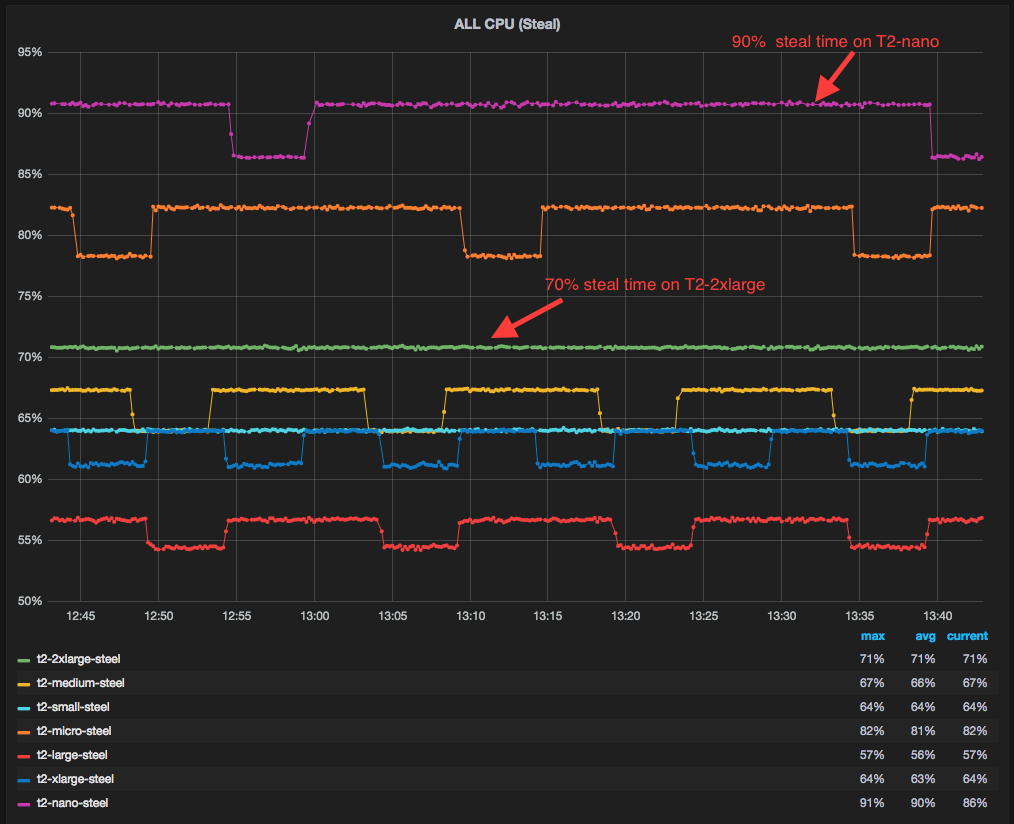
Linux kernel offers metrics: %steal, "st", as reported by mpstat and vmstat,  that can be used as an early indicator for CPU credit exhaustion.

%steal is the percent of time when instance vCPU is not running on a physical CPU. If the metric reports 70% CPU steal time, that means only 30% of physical CPU core can be used by the instance.
%steal is often thought of reporting noisy neighbor in a multi-tenant public cloud environment, where other tenants may have stolen an instance's CPU resources. In case of T2 instance family, it is showing when an instance was unable to burst. In this case, %steal is a bit misleading. Perhaps it should be called "%unable-to-use-the-physical-cpu" due to failure to burst"


%steal cpu utilization across T2 instance family while running CPU load with cpu burst credits exhausted.


%usr cpu utilization across T2 family while running CPU load with cpu burst credits exhausted. Workload cpu utilization is throttled to fraction of cpu core processing capacity.


Duration of cpu burst depends on rate a T2 instance earns credits and credit balance outstanding:
For example, T2.2xl can accumulate maximum cpu credits of 1944. Each cpu credit can provide one minute of full cpu core usage. T2.2xl has 8 cpu cores.  Multithreaded workload using all cpu cores can sustain peak throughput or performance burst for duration of 4 hours ( 1944 / 60 / 8 = 4.05 hours).  Burst can last longer if only subset of cpus are fully utilized and others are sitting idle.


T2.xl % usr cpu utilization drops when burst credits are slowly exhausted


Performance Burst Duration
Instance Type
Maximum CPU credits

CPU Cores
All CPU cores
Utilized concurrently
(Duration)
Half CPU cores utilized concurrently
(Duration)
t2.2xlarge
1944
8
4 hours
8 hours
t2.xlarge
1296
4
5.4 hours
10.8 hours
t2.large
864
2
7.2 hours
14.4 hours
t2.med
576
2
4.8 hours
9.6 hours
t2.small
288
1
4.8 hours
NA
t2.micro
144
1
2.4 hours
NA
t2.nano
72
1
1.2 hours
NA

Caution:  There is only 30 minutes of performance burst mode is available on freshly launched T2 instances and that includes credits consumed for booting the instance.

When running in performance burst mode, T2 family of instances can outperform instance with fixed performance. Performance comparison of 7-zip Compression open source benchmark across popular families


Similar benchmark was run across T2 instance family when burst credits are available and exhausted

7-zip compression benchmark with performance burst credits available


7-zip compression benchmark with performance burst credit exhausted


Network Burst

AWS offers instance types with varying network capabilities. Network throughput of instances is advertised as: Low, Moderate, High, up to 10 Gbps, 10 Gbps and 20 Gbps. New instance types supports Enhanced Networking feature that allows even a smaller instance to achieve higher network throughput and low latencies. Enhanced Networking feature allows native driver to run on an instance where it can have direct access (DMA) to subset of NIC hardware resources via PCIe SR-IOV extension that helps achieve low latency networking due to low virtualization overhead.
In addition to Enhanced Networking, instance families like I3 and R4 offer Network burst feature on smaller instance types (l|xl|2xl|4xl). These instances use network credit model, similar to CPU credit model used for T1 instance family and and IO credit model for EBS GP2, ST1/SC1 and  EFS storage. Instance accumulates network credits during low or no network traffic. Larger instance gets more credits and thus can sustain network burst of 6 Gbps for a longer period. Once all network credits are consumed, network throughout is dropped down to base levels. 
Credit system for network throughput works best for bursty workloads like Hadoop, large file transfers, that may require higher network throughput for a shorter period of network activity. 
Caution: Check if instance is configured correctly for Enhanced Networking. Run: $ sudo ethtool -i eth0. If driver field shows: ena or ixgbevf , then enhanced networking is properly configured. 

Instance Family Network Throughput
L burst/base
XL burst/base
2XL burst/base
4XL
burst/base
8XL
10XL
16XL
32XL
T2
500 Mbps
700 Mbps
960 Mbps
x
x
x
x
x
I2
x
700 Mbps
960 Mbps
2 Gbps
2 Gbps
x
x
x
I3
6 Gbps /
700 Mbps

6 Gbps /
1 Gbps
7 Gbps /
2 Gbps
9 Gbps / 4 Gbps
9 Gbps
x
15 Gbps
x
R4
6 Gbps /
700 Mbps
6 Gbps/
1 Gbps
7 Gbps /
2 Gbps
9 Gbps / 4 Gbps
9 Gbps
x
15 Gbps
x
R3
500 Mbps
700 Mbps
960 Mbps
2 Gbps
5Gbps*
x
x
x
M4
x
700 Mbps
1 Gbps
2 Gbps
x
8Gbps
12 Gbps
x
C4
500 Mbps
700 Mbps
2 Gbps
4 Gbps
9 Gbps
x
x
x
D2
x
700 Mbps
2 Gbps
4 Gbps
9 Gbps
x
x
x
X1
x
x
x
x
x
x
9 Gbps
15 Gbps
Network throughput when peers are located in the same AZ (No placement group). Considering instance Network Interface Card (NIC) on new instances supports multiple queues (RSS), load was generated from multiple 8xl instances in parallel to achieve maximum possible throughput.


Storage Burst

Amazon offers Burstable IO performances on EBS volumes of types: GP2, ST1/SC1. EFS (AWS NFS managed service) also offers performance burst feature.

GP2 Volume:
EBS GP2 volumes are optimized for higher IOPS and lower latency. EBS GP2 volumes use IO Credit model. IO credit model is based on number of IOPS. Credits are accumulated during low or no IO activity. IO credit allows the instance to achieve higher IOPS (Burst) on volume. Duration of the burst is dependent on the fill rate of IO credit bucket, that is controlled by the size of the volume. Larger the volume faster the IO credits earned. Maximum IO credit per volume is 5.4 Millions IOPS. Earned IO credits can be spent at the maximum rate of 3000 IOPS. IOPS can be of size 16-256 KB.

Once burst IO credits are exhausted due to sustain IO load, IOP or throughput are dropped down to baseline levels. Baseline IOPS is also dependent on the volume size. IO Credit model is applicable to GP2 volumes <= 1TB only. Volume larger than 1 TB does not require burst considering the baseline is already 3000 IOP. Maximum baseline of 10,000 IOPS is possible with 3.3 TB GP2 volume. 

It is recommended to use EBS optimized instances that use dedicated network link to storage instead of production network. There is a IOPS and throughput limits on a per GP2 volume and per instance level and that means if your workload require more IOPS and throughput that is offered by a single GP2 volumes, then consider stripping (raid 0) across multiple volumes to achieve higher IOPS and throughput until instance level limit is reached.

For example,  m4.4xlarge instance can support maximum of 16000 IOPS and 250 MB/s of throughput. Each GP2 volume can provide 3000-10000 IOPS and maximum throughput of 160 MB/s. To achieve 250 MB/s or 16000 IOPS, one can provision two EBS volumes and configure them as RAID-0.

Caution:  Smaller instance types may not achieve maximum throughput or IOPS offered by a single GP2 volume. For example, m4.xlarge allow maximum IO throughput of 93 MB/s  or 6000 IOPS to GP2 volume

GP2 Volume Size
Max or Initial IO credits (IOPS)
Fill time of empty IO bucket (Minutes)
Baseline IOPS
Burst IOPS
Burst Duration
(Minutes)
Max volume throughput
(MB)
Max volume IOPS
IO Size
(KB)
<= 1 TB
5.4 Million
40 - 90
3 IOPS / GB
3000
30
160
3000
16 - 256
> 1 TB
NA
NA
3000 - 10000
3000 - 10000
No burst  needed
160
10000
16 - 256
For 100 GB GP2 volume, it takes 90 minutes to fill the IO bucket once it is empty and offers 3000 maximum IOPS of sizes 16 - 256 KB. 1 TB GP2 volume can be filled in 40 minutes.
To achieve maximum IOPS supported by volume, one should use smaller IO size. To achieve maximum throughput, one should use larger IO size.


Breakdown of GP2 volume base and burst IOPS and duration
ST1/SC1 Volumes:

EBS ST1/SC1 volumes are designed for bursty streaming type (sequential IO pattern) of workloads. Unlike general purpose (GP2) volumes that offer higher IOPS and lower latencies, ST1/SC1 EBS volumes are backed by magnetic disk and optimized for higher throughput. For ST1/SC1, IO credit model is based on MB/s . ST1/SC1 volumes offer higher throughput (500 MB/s) as compared to GP2 volumes (160 MB/s).  When burst duration is exhausted, ST1/SC1 volume throughput is dropped to baseline level. 

Recommendations and concerns discussed for GP2 EBS volume such as: EBS optimized instance, instance and volume size throughput limits, also apply to ST1/SC1 volumes


ST1 Volume Size
Max or Initial IO credits
Fill Time for empty IO bucket (Minutes)
Baseline
Throughput (MB/s)
Burst Throughput (MB/s)
Burst Duration (Minutes)
Max volume Throughput (MB)
IO Size
500 GB
500 GB
436
20
125
60
125
1 MB
1 TB
1 TB
436
40
250
60
250
1 MB
2-12 TB
2-12 TB
436
80 - 480
500
60 - 400
500
1 MB
>= 12.5 TB
NA
NA
500
500
No Limit
500 MB/s
1 MB
Difference between ST1 and SC1 EBS storage is that ST1 offers higher IO base/burst combination than SC1
IO Bucket fill time is the same for all buckets considering both bucket size and fill rate increases linearly. Fill Time = Max IO credit in Bucket / fill rate.
500 G: 500 GB 20 MB/s = 436 minutes
1 TB: 1 TB / 40 MB/s = 436 minutes
12 TB: 12 TB / (40 x 12) MB/s = 436 minutes


Breakdown of ST1 volume's base, and burst throughput and duration


EFS File System:
EFS (Elastic File System) is a managed file system service from Amazon that complies with NFSv4 protocol and standards. EFS offers shared storage that can be accessed by hundreds or even thousands of EC2 instances concurrently spanning across multiple Availability Zones (AZ) within an AWS region. Unlike local filesystems, xfs, ext4, zfs, that can only be mounted on a single server, EFS is distributed file system that can span across an unconstrained number of storage servers, enabling it to grow elastically to petabyte-scale and allow massively parallel access from Amazon EC2 instances to a shared data. This distributed data storage design means applications requiring concurrent access to same data from multiple EC2 instances can able to drive substantial levels of aggregate throughput and IOPS with high levels of availability and durability. 

Caution: Distributed architecture and replication across AZ supported by EFS may result in relatively higher latency for attribute intensive file operation when compare to local filesystems. EFS sweet spot is: Read / Write operations in large block size (1- 4 MB) performed sequentially.

EFS also uses a credit system to determine the burst throughput and duration. Throughput scales with the size of data stored on EFS file system.  New file system with no data stored gets an initial credit balance of 2.1 TB that offers burst throughput of 100 MB/s for duration of 6.1 hours. Once initial burst credits are exhausted,  credit are earned at a rate of how much data is being transferred to EFS file system.
For example, EFS file system with 100 GB of stored data gets a burst credit that is sufficient to achieve 100 MB/s of  IO throughput for 72 minutes each day. When no burst credits available, throughput is throttled to 5 MB/s. Baseline rate is 50 MB/s per TB of storage used or 50 KB/s per GB of storage used. In other words, 100 GB EFS file system can burst at 100 MB/s for 5% of time if it is inactive for remaining 95% in a 24 hour period.
Caution: EFS uses aggregated throughput across all NFS clients accessing the same EFS file system when calculating 100 MB/s throughput. That means if 10 NFS clients are concurrently transferring files to the same EFS file system, each one will get 10 MB/s of IO throughput. 
Unlike EBS dedicated network link used by GP2 and ST1/SC1 storage, EFS uses production network for data transfer.

EFS File System
Baseline Throughput
Burst Throughput
Burst Duration
IO Size
% of burst time per Day
100 GB
5 MB/s
100 MB/s
72 min
1-4 MB
5% (72 minutes)
500 GB
25 MB/s
100 MB/s
6 hours
1-4 MB
25% ( 6 hours)
1 TB
50 MB/s
100 MB/s
12 hours
1-4 MB
50% (12 hours)
10 TB
500 MB/s
1 GB/s
12 hours
1-4 MB
50% (12 hours)
Maximum throughput an instance can achieve on EFS file system depends on the instance network throughput limit.